
Payroll Reversal Process
Issue- In Oracle Fusion payroll run employee got paid wrongly and amount transferred to the employee bank account as well. Later person refunded the money to the company but post process already ran in the system so we can’t rollback the process. So to fix this case we have to do the reversal at payroll end to knock of the entries.
Reversing Payroll Calculations
- A check was issued to the wrong employee.
- An overpayment or underpayment was made to an employee.
To reverse the payroll run results and costing results:
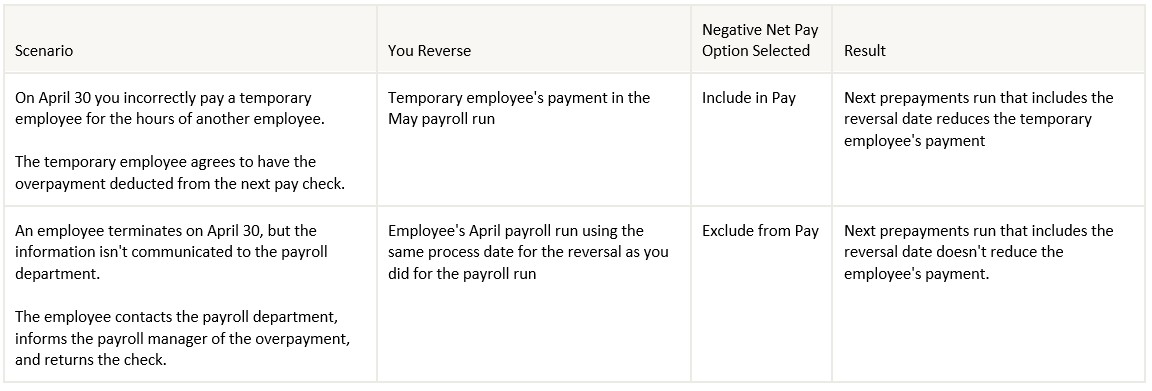
Purpose – If we don’t fix the calculation and payment thinking the amount is already refunded by the employee there are financial impact of that, as employee will get extra tax charged on the earning already refunded and also reporting issue in finance and W2 and other year-end reports.
Solution-
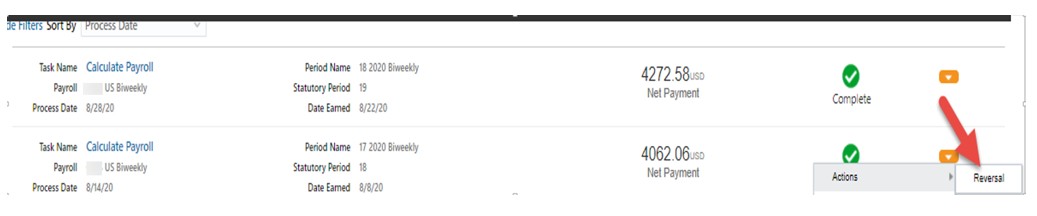
Step-1-To do the reversal we can go to the payroll which we wanted to REVERSE and select the reversal option as shown in below screenshot.
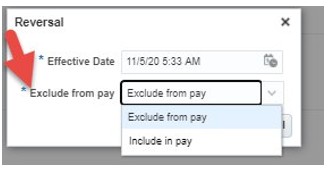
Now while doing the Reversal we have two options to process the entries. Once click we can see two below options. If we choose “Include in Pay” system will reduce this amount when next payroll process we have money to deduct from employee paycheck. But in our case as employee already refunded the money we can use “Exclude in Pay” so that it will not impact the future payroll.
Till here we are able to reverse the payroll and able to create the reverse entries, now we need to see how to reverse the payment in system which is already refunded by employee and also how to reverse the ‘Payment Costing’ in GL.
Step-2 To do that we should go to the prepayment process results and select the void payment option as shown below.

Once you select the option and by giving the date, we can void the payment. System will ask for date to void which you can give based on the date we wanted to void. Once we are able to void successfully, we can see the status as ‘VOID’.
Step 3-Now we can cancel this payment by choosing the below option. There are option to cancel and do the external payment through AP (Account Payable)
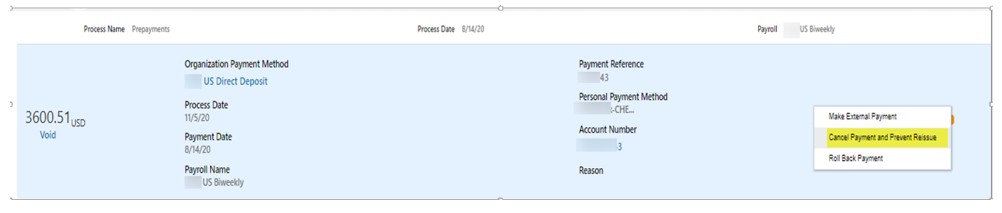
Step-4 By now we have cancelled the payment as well in the system, Next step is to run the ‘Costing of Payment”, we can run the process to pick these entries. This is required to reverse the wrong payment accounting entries already there in GL.
